STUNner Tutorial
Open a tunnel via STUNner
This tutorial shows how to tunnel an external connection via STUNner to a UDP service deployed into Kubernetes. The tutorial can also be used to quickly check a STUNner installation.
In this tutorial you will learn how to:
* configure a UDP service in Kubernetes,
* configure STUNner to expose the service to clients,
* use turncat to connect to the UDP service via STUNner,
* benchmark your cloud-setup with iperfv2.
Installation
Prerequisites
The tutorial assumes a fresh STUNner installation; see the STUNner installation and configuration
guide. Create a namespace called stunner if there is none. You must have
iperfv2 installed locally to run this tutorial.
Setup
In this tutorial we perform a quick Kubernetes/STUNner benchmark: we fire up an iperf server inside
the cluster and perform a speed test from the local console. We will use the
turncat client utility to tunnel test traffic to the iperf server via STUNner
acting as a STUN/TURN gateway.
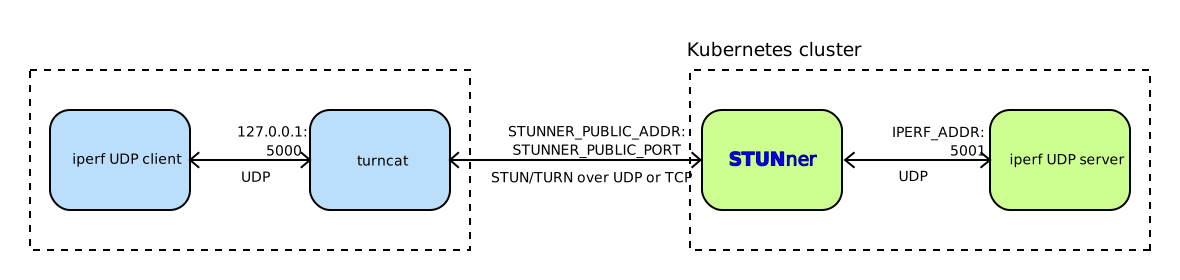
You can easily implement a makeshift VPN with STUNner using a similar setup.
Server configuration
Set up an iperf server in the default Kubernetes namespace and wrap it in a Kubernetes
service called iperf-server.
cd stunner
kubectl apply -f docs/examples/simple-tunnel/iperf-server.yaml
This will start an Deployment that runs the iperf server and wraps it in a Kubernetes service
called iperf-server of type ClusterIP. Check this service and make sure that it is not exposed to
the outside world (i.e., EXTERNAL-IP is set to <none> by Kubernetes); this makes sure that the
only way to reach this service from the local iperf speed-test client is through STUNner.
kubectl get service iperf-server  -o wide
NAME           TYPE        CLUSTER-IP    EXTERNAL-IP   PORT(S)             AGE   SELECTOR
iperf-server   ClusterIP   10.120.5.36   <none>        5001/UDP,5001/TCP   19s   app=iperf-server
STUNner configuration
Expose the service via the STUNner. The pre-compiled manifest below will create the required
GatewayClass and GateayConfig resources, fire up a Gateway listener at UDP:3478 and another one on
TCP:3478, and route client connections received on the gateways to the iperf-server
service.
kubectl apply -f docs/examples/simple-tunnel/iperf-stunner.yamlFor convenience, below is a dump of the Gateway and UDPRoute resources the manifests create. Note
that the UDPRoute specifies the iperf-server service as the backendRef, which makes sure that
STUNner will forward the client connections received in any of the Gateways to the iperf server.
apiVersion: gateway.networking.k8s.io/v1
kind: Gateway
metadata:
  name: udp-gateway
  namespace: stunner
spec:
  gatewayClassName: stunner-gatewayclass
  listeners:
    - name: udp-listener
      port: 3478
      protocol: TURN-UDP

---
apiVersion: gateway.networking.k8s.io/v1
kind: Gateway
metadata:
  name: tcp-gateway
  namespace: stunner
spec:
  gatewayClassName: stunner-gatewayclass
  listeners:
    - name: tcp-listener
      port: 3478
      protocol: TURN-TCP

---
apiVersion: stunner.l7mp.io/v1
kind: UDPRoute
metadata:
  name: iperf-server
  namespace: stunner
spec:
  parentRefs:
    - name: udp-gateway
    - name: tcp-gateway
  rules:
    - backendRefs:
        - name: iperf-server
          namespace: default
Check your configuration
Check whether you have all the necessary STUNner resources installed namespace.
kubectl get gatewayconfigs,gateways,udproutes.stunner.l7mp.io -n stunner
NAME                                                  REALM             DATAPLANE   AGE
gatewayconfig.stunner.l7mp.io/stunner-gatewayconfig   stunner.l7mp.io   default     139m

NAME                                            CLASS                  ADDRESS         PROGRAMMED   AGE
gateway.gateway.networking.k8s.io/tcp-gateway   stunner-gatewayclass   35.187.97.94    True         139m
gateway.gateway.networking.k8s.io/udp-gateway   stunner-gatewayclass   35.205.10.190   True         139m

NAME                                    AGE
udproute.stunner.l7mp.io/iperf-server   139m
You can also use the handy stunnerctl CLI tool to dump the running STUNner configuration for the
UDP gateway.
stunnerctl -n stunner config udp-gateway
Gateway: stunner/udp-gateway (loglevel: "all:INFO")
Authentication type: static, username/password: user-1/pass-1
Listeners:
  - Name: stunner/udp-gateway/udp-listener
    Protocol: TURN-UDP
    Public address:port: 34.118.88.91:3478
    Routes: [stunner/iperf-server]
    Endpoints: [10.76.1.4, 10.80.4.47]
Likewise, the below will dump the config for the TCP gateway.
stunnerctl -n stunner config tcp-gateway
Gateway: stunner/tcp-gateway (loglevel: "all:INFO")
Authentication type: static, username/password: user-1/pass-1
Listeners:
  - Name: stunner/tcp-gateway/tcp-listener
    Protocol: TURN-TCP
    Public address:port: 34.116.180.89:3478
    Routes: [stunner/iperf-server]
    Endpoints: [10.76.1.4, 10.80.4.47]
NOTE: It usually takes 30-60 seconds for Kubernetes to assign an external IP address to STUNner
gateways. As long as the external address is in <PENDING> status, STUNner exposes the Gateway on
a NodePort. Once Kubernetes finishes the exposition of the Gateway service, STUNner will pick up
the new address/port and update the config accordingly.
If in doubt, you can always query Kubernetes for the service statuses.
kubectl get -n stunner services
NAME          TYPE           CLUSTER-IP    EXTERNAL-IP     PORT(S)          AGE
stunner       ClusterIP      10.0.9.70     <none>          3478/UDP         15m
tcp-gateway   LoadBalancer   10.0.3.91     35.187.97.94    3478:31781/TCP   143m
udp-gateway   LoadBalancer   10.0.14.218   35.205.10.190   3478:31048/UDP   143m
Run the benchmark
We will need to learn the ClusterIP assigned by Kubernetes to the iperf-server service: this will
be the peer address to which turncat will ask STUNner to relay the iperf test traffic.
export IPERF_ADDR=$(kubectl get svc iperf-server -o jsonpath="{.spec.clusterIP}")Next, set up turncat to listen on UDP:127.0.0.1:5000 and tunnel connections from this listener
via the STUNner STUN/TURN listener udp-listener to the iperf server. Luckily, turncat is clever
enough to parse the running STUNner configuration from Kubernetes and set the
STUN/TURN server public address/port and the authentication credentials accordingly.
./turncat --log=all:INFO udp://127.0.0.1:5000 k8s://stunner/udp-gateway:udp-listener \
     udp://$IPERF_ADDR:5001
The most important part here is the TURN meta-URI: k8s://stunner/udp-gateway:udp-listener
instructs turncat to look for the Gateway called udp-gateway in the stunner namespace and
create a connection to the TURN listener called udp-listener of the Gateway.
Fire up an iperf client from another terminal that will connect to STUNner via turncat and start
the benchmark.
iperf -c localhost -p 5000 -u -i 1 -l 100 -b 800000 -t 10If successful, the iperf server logs should contain the benchmark results.
kubectl logs $(kubectl get pods -l app=iperf-server -o jsonpath='{.items[0].metadata.name}')
------------------------------------------------------------
Server listening on UDP port 5001 with pid 1
Read buffer size: 1.44 KByte (Dist bin width= 183 Byte)
UDP buffer size:  208 KByte (default)
------------------------------------------------------------
[  1] local 10.116.2.30%eth0 port 5001 connected with 10.116.1.21 port 56439 (peer 2.1.7)
[ ID] Interval            Transfer     Bandwidth        Jitter   Lost/Total   Latency avg/min/max/stdev PPS  inP NetPwr
...
[  1] 0.0000-9.9204 sec   977 KBytes   807 Kbits/sec    1.426 ms 0/10003 (0%) 14.256/10.791/97.428/ 4.993 ms 1008 pps 1.40 KByte 7.07
The results show that we have managed to send 1000 packets/sec through STUNner to the iperf server without packet loss, at an average one-way latency of 14.2 ms and 1.426 ms jitter. Not bad from a Kubernetes cluster running in some remote datacenter!
Repeating the test, this time with a STUN/TURN over TCP, casts a somewhat different picture. Notice
the new meta-URI: k8s://stunner/tcp-gateway:tcp-listener to select the TURN server exposed on
TCP forturncat.
./turncat --log=all:INFO udp://127.0.0.1:5000 k8s://stunner/tcp-gateway:tcp-listener \
     udp://$IPERF_ADDR:5001
Run the benchmark again at 10kpps and watch the logs.
iperf -c localhost -p 5000 -u -l 100 -b 8000000 -o /dev/null -t 10 && \
    kubectl logs $(kubectl get pods -l app=iperf-server -o jsonpath='{.items[0].metadata.name}') | tail -n 1
[  3] 0.0000-9.9365 sec  9.41 MBytes  7.94 Mbits/sec   0.085 ms 1361/100003 (1.4%) 148.261/21.098/454.266/73.704 ms 9927 pps  144 KByte 6.70
It seems that average latency has jumped to 148 ms, with a max latency of close to 460 ms! That's why you should avoid TCP at all cost in real-time communications.
Cleaning up
Stop turncat and wipe all Kubernetes configuration.
kubectl delete -f docs/examples/simple-tunnel/iperf-server.yaml
kubectl delete -f docs/examples/simple-tunnel/iperf-stunner.yaml